A cracked screen is the most common phone repair. On most modern phones the glass, touch layer and display are fused into one assembly, so you replace the complete display, not only the glass. This guide explains the general steps. The exact order differs per model, so always look at how your phone is built before you start.
Screen only, or screen with frame?
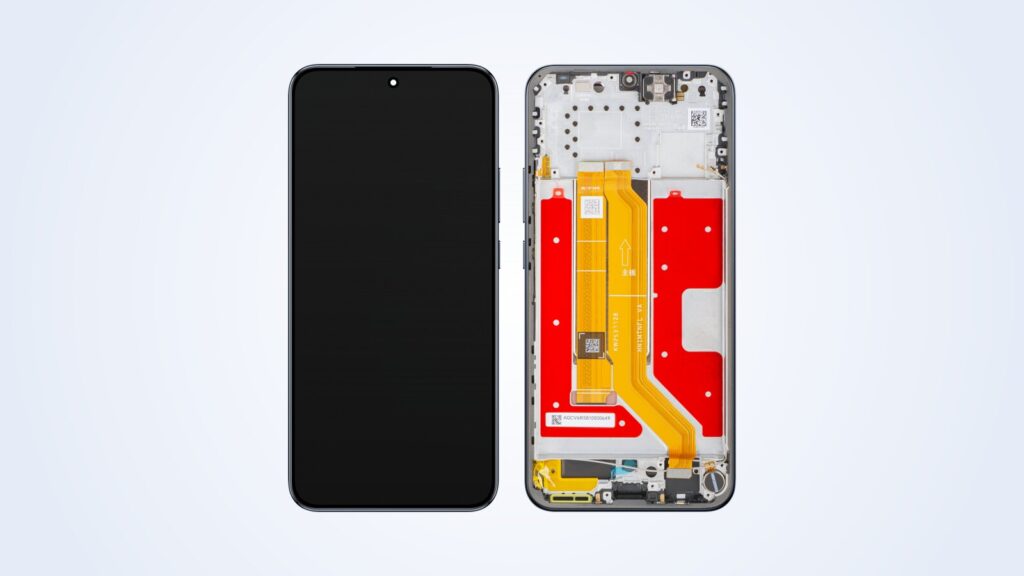
Many displays are sold in two versions:
- Display + touchscreen: only the screen assembly. You move it into your existing frame. Cheaper, but more work, because you need to remove the old screen from the frame and glue the new one in.
- Display + touchscreen + frame: the screen comes pre-installed in a new frame. You move the board, battery and other parts into the new frame. Often easier and the result looks like new.
What you need
- The correct replacement display for your exact model
- Precision screwdrivers (often Phillips, Pentalobe or Tri-point)
- Plastic opening picks, a suction cup and a spudger
- A heat source (heat pad or hair dryer on low) to soften the adhesive
- New display adhesive or a pre-cut adhesive sticker
- Tweezers and, for some models, an ESD-safe mat
You find these in our repair tools section.
Before you start
- Back up your phone and switch it off completely.
- Check the exact model number (Settings › About phone, or the text on the SIM tray or the back). Parts that look the same often differ between models such as “5G” and “4G” or “Pro” and “Pro Max”.
- Opening a phone can end the manufacturer’s warranty and can affect water resistance. If your phone is still under warranty, check with the manufacturer first.
- Work on a clean, well-lit table with a soft mat. Keep screws in order: many phones use screws of different lengths, and a long screw in the wrong hole can damage the board.
Step by step
- Heat the edges. Warm the edges of the screen (or the back, on phones that open from the back) for a few minutes to soften the adhesive. Warm, not hot: you should be able to touch it.
- Lift the panel. Place the suction cup near the bottom edge, pull gently and slide an opening pick into the gap. Work slowly around the edge. Do not insert the pick deeper than a few millimetres: flex cables run close to the edge.
- Open carefully. Open the phone like a book on the side where the flex cables are, and support the screen so the cables are not stretched.
- Disconnect the battery first. Remove the bracket over the battery connector and lift the connector with a plastic spudger. Never work on a phone with the battery connected.
- Disconnect the display. Remove the shields over the display connectors and disconnect them. Some phones have separate connectors for the display, touch and front sensors.
- Transfer small parts. Move parts that do not come with the new screen: earpiece speaker, front camera or sensor bracket, and on some models a fingerprint sensor. Handle Face ID and proximity sensor parts with great care: on many phones they are paired to the board.
- Test before you close. Connect the new display and the battery, switch the phone on and test touch on the whole screen, brightness, the front camera, the earpiece and auto-rotate. Then switch off and disconnect the battery again.
- Close the phone. Apply fresh adhesive, reconnect everything, fit the brackets with the right screws and press the screen into place. Keep light pressure on it (for example under a few books) for a while so the adhesive bonds.
Common problems after a screen replacement
- No image: the display connector is not fully seated. Disconnect the battery and reconnect the display.
- Touch does not work, or works partly: check the touch connector, and check that no screw or bracket presses on a flex cable.
- “Unknown part” message: some brands show a message when a screen is replaced. On most phones the screen keeps working; features such as True Tone may need the original screen data.
- Gap at the edge: old adhesive was left behind, or the frame is bent. Clean the frame completely before applying new adhesive.
Parts for this repair
- LCD Display + Touchscreen + Frame (32 products)
- LCD Display + Touchscreen (53 products)
- Adhesive Tape Front (46 products)
- LCD Frame (87 products)
Not sure which screen fits? Use the Part finder on our homepage, or search by the model number of your phone.